6. Web-camera and traffic-light control
The traffic light control is implemented through OpenCV videocapture system. The class TimeAdviser implements the traffic light control feature of the system.
class TimeAdvicer:
"""
Main class for the car detection.
Captures the road image and finds cars on it.
"""
def __init__(self, camN=0, file1="test1.jpg", file2="test2.jpg"):
    """

    :param camN: Number of device /dev/video*
    :param file1: Outfile for the first part of the road
    :param file2: Outfile for the second part of the road
    """
    self.cam=cv2.VideoCapture(camN)
    self.file1=file1
    self.file2=file2
    self.broken=False
The system requires the empty road to be shown at the beginning. Function TEST is called to detect the road and to print out parts of the road. This allows to find the zones of interest, which are parts of the crossroad.
def test(self):
"""
Detects the road and print it as two images.
:return: True if the road has been detected. False otherwise.
"""
    #Road detection indicator
    flag=False
    #Capture the road image from the webcam
    ret, image = self.cam.read()
    #Get the objects' borders
    gray = cv2.cvtColor(image, cv2.COLOR_BGR2GRAY)
    blurred = cv2.GaussianBlur(gray, (5, 5), 0)
    edged = cv2.Canny(blurred, 50, 200, 255)

    # Find contours in the edge map, then sort them by their
    # Size in descending order
    cnts = cv2.findContours(edged.copy(), cv2.RETR_EXTERNAL,
                            cv2.CHAIN_APPROX_SIMPLE)
    cnts = cnts[0] if imutils.is_cv2() else cnts[1]
    cnts = sorted(cnts, key=cv2.contourArea, reverse=True)

    #Set of contours' points
    displayCnt = None

    # Loop over the contours
    for c in cnts:
        # Approximate the contour
        peri = cv2.arcLength(c, True)
        approx = cv2.approxPolyDP(c, 0.02 * peri, True)

        # If the contour has four vertices, then we have found
        # the thermostat display
        if (len(approx) == 12) and (cv2.contourArea(c)>=1000):
            displayCnt = approx

            #Debug mode
            flag=True
            break
    # X and Y of contour points
    roadx = []
    roady = []

    for i in displayCnt:
        roadx.append(i[0][0])
        roady.append(i[0][1])

    # Get the set of the contours' points
    pts = []
    for i in range(0, len(roadx)):
        pts.append([roadx[i], roady[i]])

    # Get the array with border numbers
    convexNums = grahamscan(pts)


    xFirst = convexNums[0]
    # Getting first half of the road

    firstHalfRoad = [point for point in convexNums if (isNear((pts[point])[0], (pts[xFirst])[0]) \
                                                       or isNear((pts[point])[1],
                                                                 (pts[xFirst])[1])) and point != xFirst]

    firstRoad = [point for point in convexNums if (isNear((pts[point])[0], (pts[firstHalfRoad[0]])[0]) \
                                                   or isNear((pts[point])[1],
                                                             (pts[firstHalfRoad[0]])[1])) and point !=
                 firstHalfRoad[0]] + firstHalfRoad
    # Other half of the road
    secondRoad = [i for i in set(convexNums) - set(firstRoad)]

    # Get two rectangles for the road recognition
    localApproxFirstRoad = [[[]]]
    localApproxSecondRoad = [[[]]]
    for y in firstRoad:
        localApproxFirstRoad.append([[pts[y]]])
    localApproxFirstRoad.pop(0)
    for y in secondRoad:
        localApproxSecondRoad.append([[pts[y]]])
    localApproxSecondRoad.pop(0)

    self.coordsOfFirstRoad = np.array(localApproxFirstRoad)
    self.coordsOfSecondRoad = np.array(localApproxSecondRoad)

    # Print out the road parts to images
    r1 = four_point_transform(gray, self.coordsOfFirstRoad.reshape(4, 2))
    cv2.imwrite(self.file1, r1)
    r2 = four_point_transform(gray, self.coordsOfSecondRoad.reshape(4, 2))
    cv2.imwrite(self.file2, r2)
    return flag
The function returns true and gives two files with given names, which are parts of the road, if the road has been detected. The example of the output images:
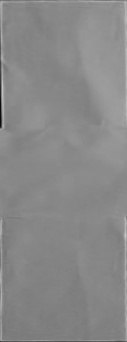
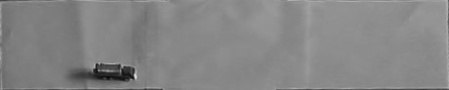
After that, connected-components analysis helps to find cars on the road. The function getCarN is implemented to count the number of cars which are on the road.
def getCarN(self):
"""
Detects objects on the road
:return: The number of cars on both first and second roads as x,y
"""
try:
    if self.broken==True:
        return 1, 1
    # Get the road images
    ret, image = self.cam.read()
    # Get the objects' borders
    gray = cv2.cvtColor(image, cv2.COLOR_BGR2GRAY)
    r1 = four_point_transform(gray, self.coordsOfFirstRoad.reshape(4, 2))
    cv2.imwrite(self.file1, r1)
    r2 = four_point_transform(gray, self.coordsOfSecondRoad.reshape(4, 2))
    cv2.imwrite(self.file2, r2)

    # Calculate the threshold
    mean = 0
    for i in r1:
        for j in range(0, len(i)):
            mean += i[j]
    mean = mean / (len(r1) - 1) / (len(r1[0]) - 1)

    # Get the car imaga on the road
    blurred = cv2.GaussianBlur(r1, (11, 11), 0)
    thresh = cv2.threshold(blurred, mean * 0.8, 255, cv2.THRESH_BINARY_INV)[1]
    thresh = cv2.erode(thresh, None, iterations=2)
    thresh = cv2.dilate(thresh, None, iterations=4)
    labels1 = measure.label(thresh, neighbors=8, background=0, return_num=True)
    cv2.imwrite(self.file1, thresh)

    #Same for the second road
    mean = 0
    for i in r2:
        for j in range(0, len(i)):
            mean += i[j]
    mean = mean / (len(r2) - 1) / (len(r2[0]) - 1)
    blurred = cv2.GaussianBlur(r2, (11, 11), 0)
    thresh = cv2.threshold(blurred, mean * 0.8, 255, cv2.THRESH_BINARY_INV)[1]
    thresh = cv2.erode(thresh, None, iterations=2)
    thresh = cv2.dilate(thresh, None, iterations=4)
    labels2 = measure.label(thresh, neighbors=8, background=0, return_num=True)
    cv2.imwrite(self.file2, thresh)
    # Return the number of connected components
    return labels1[1], labels2[1]
The simple intermediate result of the analysis is the following.

The output is how many cars are currently on the road. Depending on the traffic, server will set the necessary timer value.